[fusion_builder_container backgroundcolor=”” backgroundimage=”” backgroundrepeat=”no-repeat” backgroundposition=”left top” backgroundattachment=”scroll” video_webm=”” video_mp4=”” video_ogv=”” video_preview_image=”” overlay_color=”” overlay_opacity=”0.5″ video_mute=”yes” video_loop=”yes” fade=”no” bordersize=”0px” bordercolor=”” borderstyle=”solid” paddingtop=”0px” paddingbottom=”20px” padding_left=”” padding_right==”0px” menu_anchor=”” equal_height_columns=”no” hundred_percent=”no” class=”” id=””][fusion_builder_row][fusion_builder_column type=”1_1″ background_position=”left top” background_color=”” border_size=”” border_color=”” border_style=”solid” spacing=”yes” background_image=”” background_repeat=”no-repeat” padding=”” margin_top=”0px” margin_bottom=”0px” class=”” id=”” animation_type=”” animation_speed=”0.3″ animation_direction=”left” hide_on_mobile=”no” center_content=”no” min_height=”none”][fusion_text]
How To Create Beautiful Photography
Find Out Why 1,000s Of Photographers Are Using This Course To Produce Stunning Photos
[/fusion_text][fusion_separator style_type=”double solid” top_margin=”0″ bottom_margin=”25″ sep_color=”” icon=”” width=”” class=”” id=””/][fusion_text]
[/fusion_text][/fusion_builder_column][/fusion_builder_row][/fusion_builder_container][fusion_builder_container backgroundcolor=”#ededed” backgroundimage=”https://www.shutterevolve.com/wp-content/uploads/2014/12/image-background.jpg” backgroundrepeat=”no-repeat” backgroundposition=”left top” backgroundattachment=”fixed” video_webm=”” video_mp4=”” video_ogv=”” video_preview_image=”” overlay_color=”” overlay_opacity=”0.5″ video_mute=”yes” video_loop=”yes” fade=”no” bordersize=”1px” bordercolor=”” borderstyle=”solid” paddingtop=”20px” paddingbottom=”10px” padding_left=”0px”padding_right==”0px” menu_anchor=”” equal_height_columns=”no” hundred_percent=”no” class=”” id=””][fusion_builder_row][fusion_builder_column type=”1_3″ last=”no” spacing=”yes” background_color=”” background_image=”” background_repeat=”no-repeat” background_position=”left top” border_size=”0px” border_color=”” border_style=”” padding=”” class=”” id=””][fusion_text]
[fusion_checklist icon=”” iconcolor=”” circle=”” circlecolor=”” size=”small” class=”” id=””]
[fusion_li_item icon=””] Learn To Use A Powerful Post-Processing Workflow in Photoshop [/fusion_li_item]
[fusion_li_item icon=””] Luminosity Masks Will Push Your Images To Professional Levels [/fusion_li_item]
[fusion_li_item icon=””]Download Instantly and Watch in Your Own Time [/fusion_li_item]
[fusion_li_item icon=””] Easily Blend Exposures To Create Beautiful Photos [/fusion_li_item]
[fusion_li_item icon=””]Increase Your Exposure Through Stunning Imagery [/fusion_li_item]
[fusion_li_item icon=””]Master Advanced Photoshop Techniques [/fusion_li_item]
[fusion_li_item icon=””]Also Included – A Free 2+ Hour Beginner’s Photoshop Course[/fusion_li_item]
[/fusion_checklist][/fusion_text][/fusion_builder_column][fusion_builder_column type=”2_3″ last=”yes” spacing=”yes” background_color=”” background_image=”” background_repeat=”no-repeat” background_position=”left top” border_size=”0px” border_color=”” border_style=”” padding=”” class=”” id=””][fusion_text]
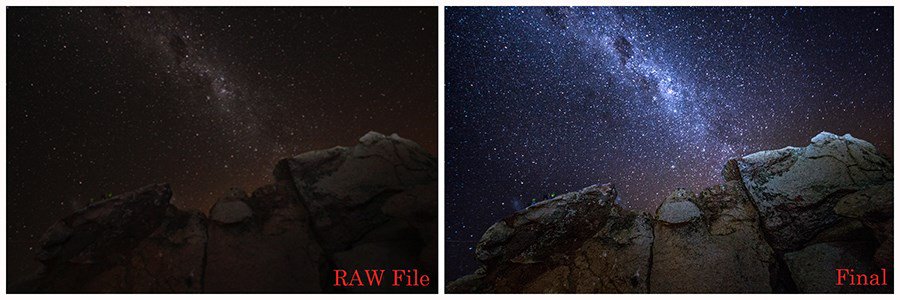
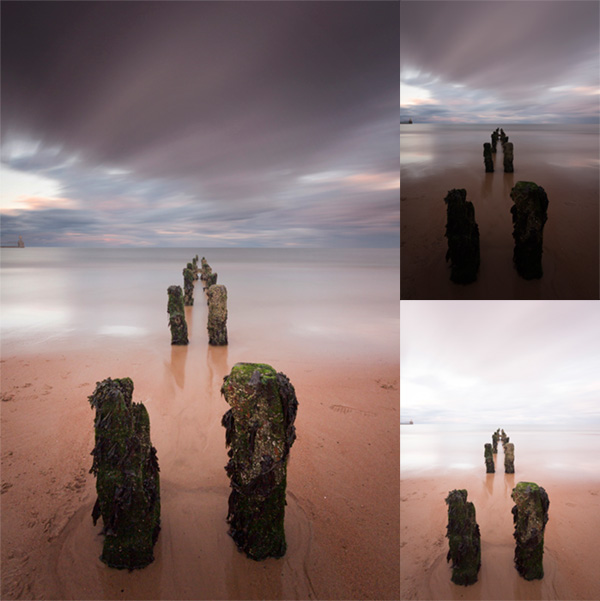
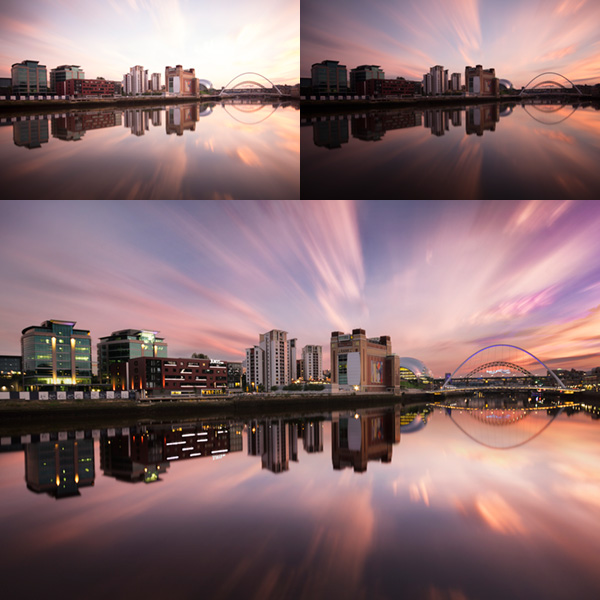
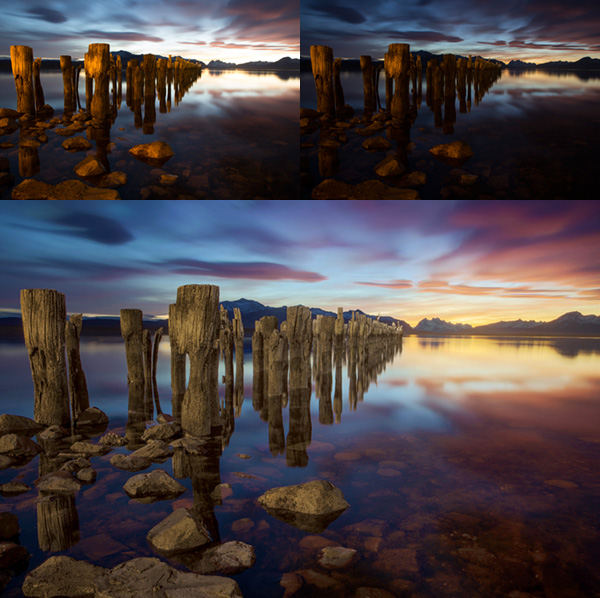
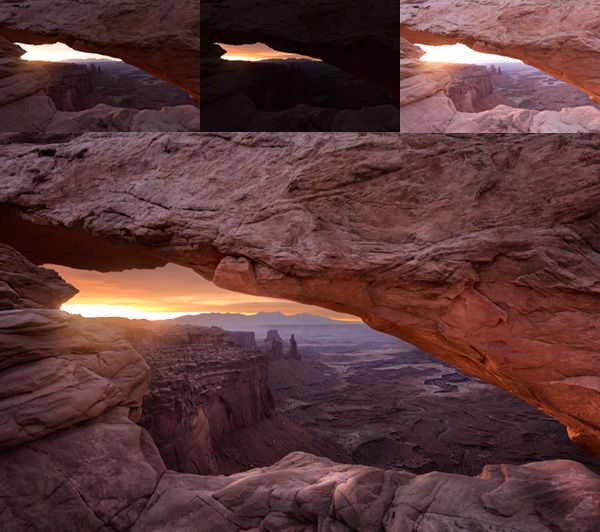
[before-after width=”600px”]
[/before-after]
[/fusion_text][/fusion_builder_column][/fusion_builder_row][/fusion_builder_container][fusion_builder_container backgroundcolor=”” backgroundimage=”” backgroundrepeat=”no-repeat” backgroundposition=”left top” backgroundattachment=”scroll” video_webm=”” video_mp4=”” video_ogv=”” video_preview_image=”” overlay_color=”” overlay_opacity=”0.5″ video_mute=”yes” video_loop=”yes” fade=”no” bordersize=”0px” bordercolor=”” borderstyle=”solid” paddingtop=”20px” paddingbottom=”0px” paddingleft=”0px” paddingright=”0px” menu_anchor=”” equal_height_columns=”no” hundred_percent=”no” class=”” id=””][fusion_builder_row][fusion_builder_column type=”1_1″ background_position=”left top” background_color=”” border_size=”” border_color=”” border_style=”solid” spacing=”yes” background_image=”” background_repeat=”no-repeat” padding=”” margin_top=”0px” margin_bottom=”0px” class=”” id=”” animation_type=”” animation_speed=”0.3″ animation_direction=”left” hide_on_mobile=”no” center_content=”no” min_height=”none”][fusion_text]
About Jimmy McIntyre
Jimmy McIntyre is an experienced travel photographer and international trainer. He was recently named as one of the Top Photographers on 500px.com by Fstoppers.com. He has taught photography workshops on four continents, and his courses have been sold to 1,000s of photographers worldwide. He has had the pleasure of writing for some of the biggest photography sites in the world. See his portfolio here: Portfolio
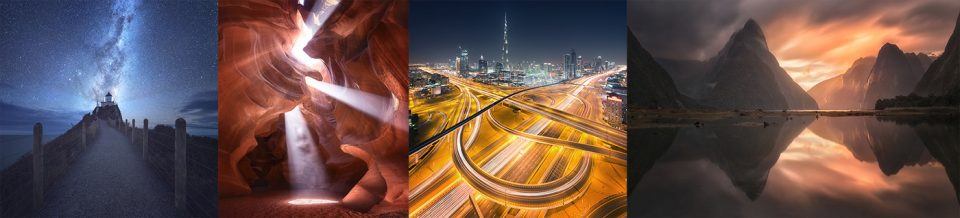
Some Of Jimmy’s Recent Images
[/fusion_text][/fusion_builder_column][fusion_builder_column type=”1_4″ last=”no” spacing=”yes” background_color=”” background_image=”” background_repeat=”no-repeat” background_position=”left top” border_size=”0px” border_color=”” border_style=”” padding=”” class=”” id=””][fusion_text]
[/fusion_text][/fusion_builder_column][fusion_builder_column type=”1_4″ last=”no” spacing=”yes” background_color=”” background_image=”” background_repeat=”no-repeat” background_position=”left top” border_size=”0px” border_color=”” border_style=”” padding=”” class=”” id=””][fusion_text]
[/fusion_text][/fusion_builder_column][fusion_builder_column type=”1_4″ last=”no” spacing=”yes” background_color=”” background_image=”” background_repeat=”no-repeat” background_position=”left top” border_size=”0px” border_color=”” border_style=”” padding=”” class=”” id=””][fusion_text]
[/fusion_text][/fusion_builder_column][fusion_builder_column type=”1_4″ last=”yes” spacing=”yes” background_color=”” background_image=”” background_repeat=”no-repeat” background_position=”left top” border_size=”0px” border_color=”” border_style=”solid” padding=”” class=”” id=””][fusion_text]
[/fusion_text][/fusion_builder_column][/fusion_builder_row][/fusion_builder_container][fusion_builder_container backgroundcolor=”#606060″ backgroundimage=”” backgroundrepeat=”no-repeat” backgroundposition=”left top” backgroundattachment=”fixed” video_webm=”” video_mp4=”” video_ogv=”” video_preview_image=”” overlay_color=”” overlay_opacity=”0.5″ video_mute=”yes” video_loop=”yes” fade=”no” bordersize=”0px” bordercolor=”” borderstyle=”solid” paddingtop=”5px” paddingbottom=”-15px” paddingleft=”0px” paddingright=”0px” menu_anchor=”” equal_height_columns=”no” hundred_percent=”no” class=”” id=””][fusion_builder_row][fusion_builder_column type=”1_1″ background_position=”left top” background_color=”” border_size=”” border_color=”” border_style=”solid” spacing=”yes” background_image=”” background_repeat=”no-repeat” padding=”” margin_top=”0px” margin_bottom=”0px” class=”” id=”” animation_type=”” animation_speed=”0.3″ animation_direction=”left” hide_on_mobile=”no” center_content=”no” min_height=”none”][fusion_text]
“Go straight to purchasing the tutorials.”
“I can’t describe how fundamentally it has changed my editing and results. Life changing!” Tom Stone
[/fusion_text][/fusion_builder_column][fusion_builder_column type=”1_1″ background_position=”left top” background_color=”” border_size=”” border_color=”” border_style=”solid” spacing=”yes” background_image=”” background_repeat=”no-repeat” padding=”” margin_top=”0px” margin_bottom=”0px” class=”” id=”” animation_type=”” animation_speed=”0.3″ animation_direction=”left” hide_on_mobile=”no” center_content=”no” min_height=”none”][fusion_section_separator divider_candy=”bottom” icon=”fa-sort-desc” icon_color=”” bordersize=”1px” bordercolor=”#606060″ backgroundcolor=”#606060″ class=”” id=””/][/fusion_builder_column][/fusion_builder_row][/fusion_builder_container][fusion_builder_container backgroundcolor=”” backgroundimage=”” backgroundrepeat=”no-repeat” backgroundposition=”left top” backgroundattachment=”scroll” video_webm=”” video_mp4=”” video_ogv=”” video_preview_image=”” overlay_color=”” overlay_opacity=”0.5″ video_mute=”yes” video_loop=”yes” fade=”no” bordersize=”0px” bordercolor=”” borderstyle=”solid” paddingtop=”40px” paddingbottom=”20px” paddingleft=”0px” paddingright=”0px” menu_anchor=”” equal_height_columns=”no” hundred_percent=”no” class=”” id=””][fusion_builder_row][fusion_builder_column type=”2_3″ last=”no” spacing=”yes” background_color=”” background_image=”” background_repeat=”no-repeat” background_position=”left top” border_size=”0px” border_color=”” border_style=”” padding=”” class=”” id=””][fusion_text]
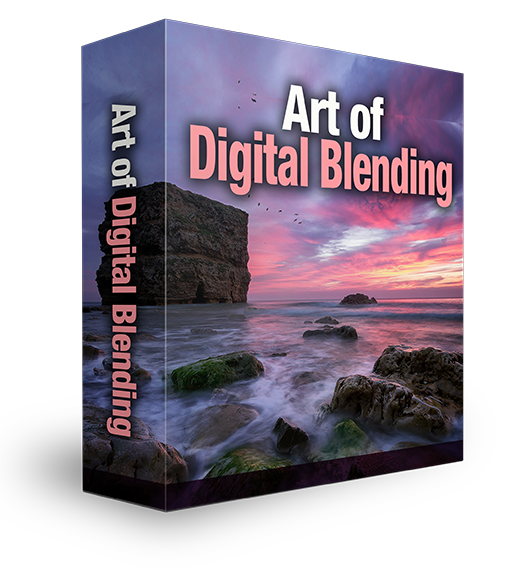
The Art of Digital Blending Course
For followers of EV Magazine, use the code
Just $44.99 $35.99!
Paypal Secure Payment – Credit Cards Accepted: See Below For Details – 100% Money Back Guarantee Within 30 Days – Completely Risk-Free
[/fusion_text][fusion_tabs design=”” layout=”horizontal” justified=”” backgroundcolor=”” inactivecolor=”” bordercolor=”” class=”” id=””][fusion_tab title=”Overview” icon=””]
The Most Advanced Luminosity Masks Tutorial In The World
The Same Techniques Jimmy McIntyre Uses To Get On The Front Page of 500px With Each Photo
Get An Incredible Response On Social Media From Your Photos
(Click on image to see original photo on Facebook)
Watch a preview of some of the tutorials you’ll find in this course
You will learn…
[fusion_checklist icon=”” iconcolor=”” circle=”” circlecolor=”” size=”small” class=”” id=””]
[fusion_li_item icon=””]What luminosity masks are and how to create them.[/fusion_li_item]
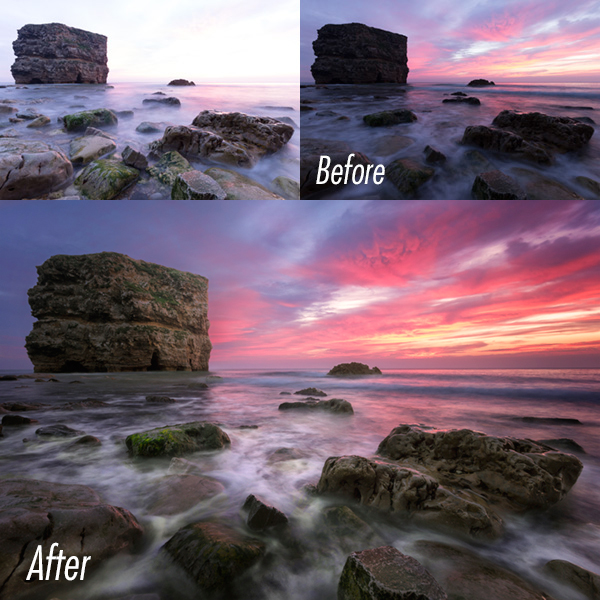
[fusion_li_item icon=””]How to effortlessly blend multiple exposures to create a balanced, sharp image.[/fusion_li_item]
[fusion_li_item icon=””]How to blend between 2, 3, 4 and more exposures[/fusion_li_item]
[fusion_li_item icon=””]How to blend long exposure images[/fusion_li_item]
[fusion_li_item icon=””]How to create advanced selections using temporary adjustment layers[/fusion_li_item]
[fusion_li_item icon=””]How to create targeted local contrast to make your images pop[/fusion_li_item]
[fusion_li_item icon=””]How to intersect Alpha channels to further refine selections[/fusion_li_item]
[fusion_li_item icon=””]How co combine 32bit HDR with luminosity mask exposure blending for powerfully natural results[/fusion_li_item]
[fusion_li_item icon=””]How to subtract channels to make precise luminosity selections[/fusion_li_item]
[fusion_li_item icon=””]How to use a 100% non-destructive workflow[/fusion_li_item]
[fusion_li_item icon=””]How to intensify a sunset[/fusion_li_item]
[fusion_li_item icon=””]How to prepare Images in Adobe Camera Raw[/fusion_li_item]
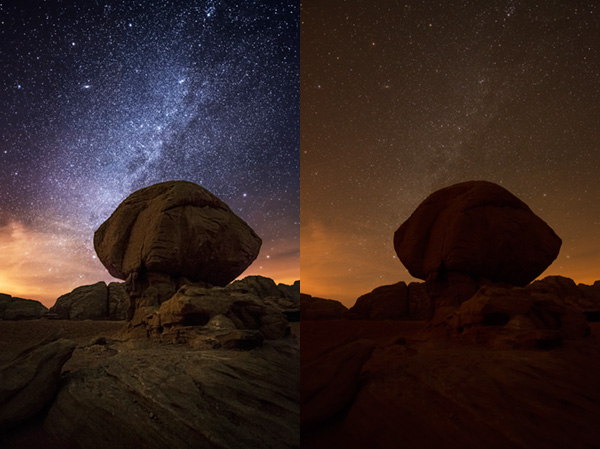
[fusion_li_item icon=””]How to create stunning Milky Way shots[/fusion_li_item]
[fusion_li_item icon=””]How to remove noise non-destructively[/fusion_li_item]
[fusion_li_item icon=””]Quick and accurate selective adjustment layers[/fusion_li_item]
[fusion_li_item icon=””]How to accurately target areas for sharpening while avoiding areas prone to noise[/fusion_li_item]
[fusion_li_item icon=””]How to pull details out of targeted areas[/fusion_li_item]
[fusion_li_item icon=””]How to make advanced selections based on colours[/fusion_li_item]
[fusion_li_item icon=””]Bonus tutorial included – What masking is (For beginners to masking in Photoshop)[/fusion_li_item]
[/fusion_checklist]
[/fusion_tab][fusion_tab title=”Contents” icon=””]
What’s Included?
[fusion_checklist icon=”” iconcolor=”” circle=”” circlecolor=”” size=”small” class=”” id=””]
[fusion_li_item icon=””]More than 2.5 hours of fast paced, luminosity mask training. The course is scripted so that every sentence is designed to teach you advanced luminosity masks. There is no waffle – just effective learning from the first moment.[/fusion_li_item]
[fusion_li_item icon=””]12 Videos, Part 1 has 5 videos, starting with the absolute basics, to how to create luminosity masks, how to make specific adjustments, and then onto a full Milky Way workflow. Part 2 teaches advanced exposure blending, starting with which exposure to create the masks on, which masks to use in the blending process, and how many exposures you need. Then we move onto 5 full digital blending workflows that will teach you everything you need to know about how to create stunning images with luminosity masks.[/fusion_li_item]
[fusion_li_item icon=””]Photoshop Powerpack Actions. Luminosity Masks actions (create & delete), Orton Effect, Detail Enhancer, Dodge & Burn, Autumn Colours.[/fusion_li_item]
[fusion_li_item icon=””]21,500 word pdf, which includes the entire transcript of the course, word-for-word – great for people with hearing-impairments or whose first language isn’t English.[/fusion_li_item]
[fusion_li_item icon=””]A Free 2+ Hour Beginner’s Photoshop Course[/fusion_li_item]
[fusion_li_item icon=””]A bonus video for people who are new to masking[/fusion_li_item]
[fusion_li_item icon=””]All of the original RAW files for you to follow along with. And in case your Adobe Camera Raw doesn’t support the RAW files, there are also JPEGs that you can use instead, which have already received ACR treatment.[/fusion_li_item]
[fusion_li_item icon=””]All videos are in MP4 format so you can follow them on mobile devices too[/fusion_li_item]
[/fusion_checklist]
What are the Software Requirements?
Photoshop CS3 upwards is necessary for the full luminosity mask course. To follow the 32 bit bonus tutorial, Photoshop CS6 and Adobe Camera Raw 7.3 is needed. Nik Color Efex (Or similar), and a noise removal program like Topaz DeNoise are also necessary. [/fusion_tab][fusion_tab title=”Images” icon=””]
You’ll master the art of luminosity masks by creating these images, and more….
[/fusion_tab][fusion_tab title=”Reviews” icon=””][fusion_testimonials backgroundcolor=”” textcolor=””] [fusion_testimonial name=”Blake Rudis” gender=”male” company=”EveryDayHDR.com” link=”http://everydayhdr.com” target=”_blank”]”Jimmy’s Advanced course will take your cookie dough post processing and carve it into wood with utmost craftsmanship”[/fusion_testimonial] [/fusion_testimonials][fusion_testimonials backgroundcolor=”” textcolor=””] [fusion_testimonial name=”Tom Stone” gender=”male” company=”Portfolio” link=”http://500px.com/hillbillydeluxe” target=”_blank”]”Wow! The course is great! Simple and straightforward, you have
definitely opened a new door for me in my post processing work!
Good-bye plug-ins…well most of my plug-ins LOL. “[/fusion_testimonial] [/fusion_testimonials]
[fusion_testimonials backgroundcolor=”” textcolor=””] [fusion_testimonial name=”Marmy Nagi” gender=”male” ]”Okay, you’ve got the camera and you are nailing the compositions, but your processing leaves you scratching your head.
Well then, it’s time to stop beating yourself up and to purchase the Art of Digital Blending course…better still, just buy the Masterclass Pack!
In no time at all you’ll be pulling data from your camera that you would have otherwise thought impossible. Take your processing skills to the level you want them to be at with easy to follow videos and sample images to practice on.Just do it…!”
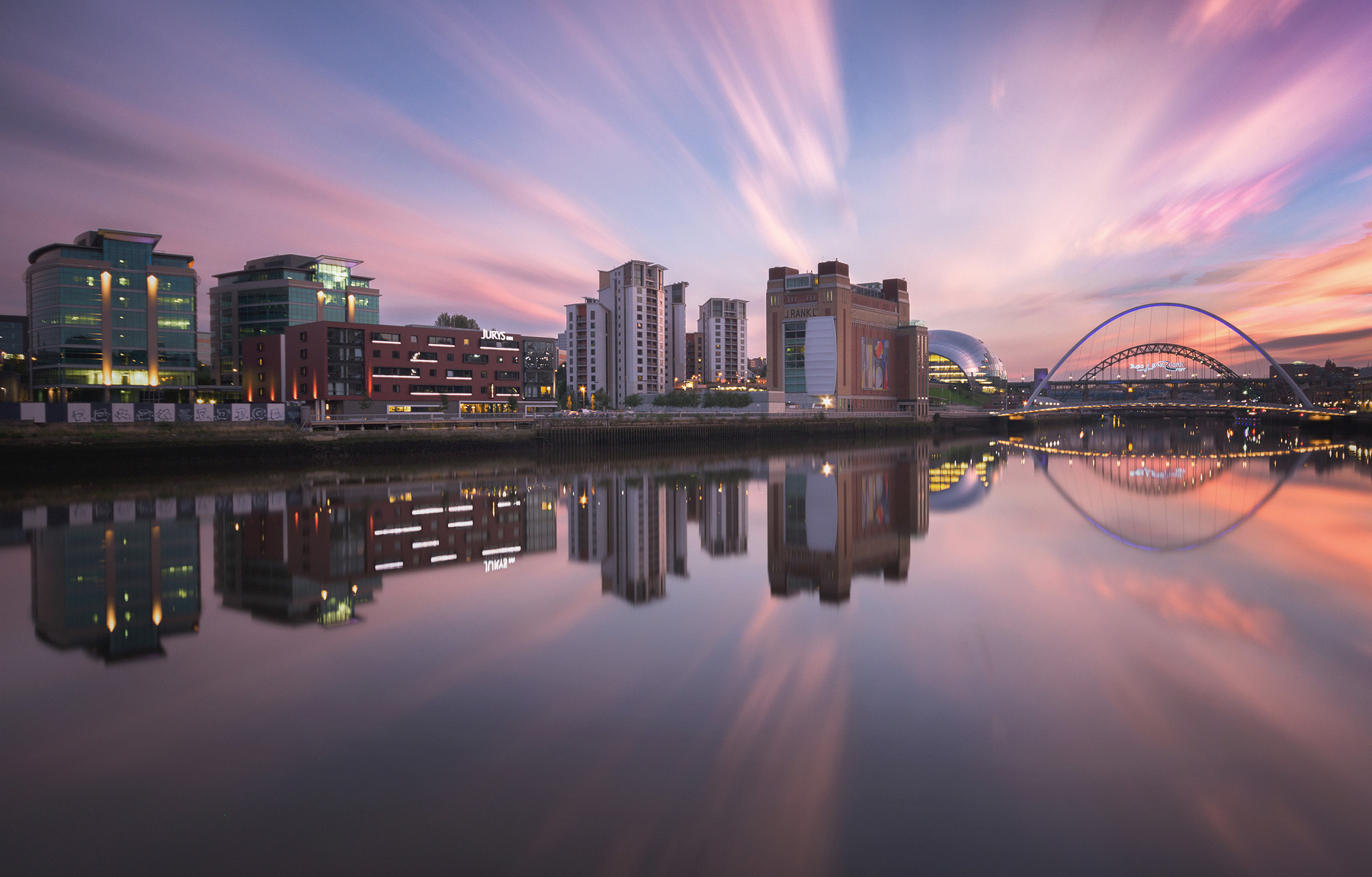
Marmy’s Photo Using The Techniques In This Course
[/fusion_testimonial] [/fusion_testimonials]
[fusion_testimonials backgroundcolor=”” textcolor=””] [fusion_testimonial name=”Celeste de Beer” gender=”female” company=”Portfolio” link=”http://www.facebook.com/celeste2808.debeer” target=”_blank”]”I can highly recommend Jimmy’s courses. After just one section of one chapter of one course my images have improved exponentially.
Tnx Jimmy! I am now forever a fan of both your work and your courses”
My example image:
[/fusion_testimonial] [/fusion_testimonials]
[fusion_testimonials backgroundcolor=”” textcolor=””] [fusion_testimonial name=”Sam Riseborough” gender=”male” company=”Portfolio” link=”http://www.samoncam.com” target=”_blank”]”You sir, are a genious! Luminosity masks have changed my life! AMAZING! I also just bought the Topaz Labs DeNoiz plugin. Outrageous! Great training pack, man! The Actions and included DNG’s are just gold! I’ll be recommending you to all my phototog buds. [/fusion_testimonial] [/fusion_testimonials] [fusion_testimonials backgroundcolor=”” textcolor=””] [fusion_testimonial name=”Art Cid” gender=”male” company=”Portfolio” link=”http://www.artcid.com/” target=”_blank”]”Jimmy I cannot say enough about your tutorials they are by far the
best I have ever seen and very easy to follow. Just so much fun.
Thanks
Art Cid”[/fusion_testimonial] [/fusion_testimonials][fusion_testimonials backgroundcolor=”” textcolor=””][fusion_testimonial name=”Massimiliano Fontana” gender=”male” company=”www.juzaphoto.com” link=”http://www.juzaphoto.com/p/Maxfontana” target=”_blank”]”Just bought and downloaded your instructional video and among many videos already seen, I have to admit that yours is without any doubt the best I’ve ever seen! Well explained and done. Not a 3 hrs boring explanation but a direct and effective way to learn and use the powerful luminosity masks.”[/fusion_testimonial] [/fusion_testimonials][fusion_testimonials backgroundcolor=”” textcolor=””] [fusion_testimonial name=”Emanuele Serraino” gender=”male” company=”Portfolio” link=”https://www.facebook.com/EmanueleSerrainoPhotography” target=”_blank”]”There is always a bit of confusion about what the Digital Blending is. This course is the best and most specific answer you can find at the moment. Jimmy explains with disarming simplicity the technique, by covering all the steps, from RAW conversion to manual exposure blending, from further processing to finishing touches, describing in every detail the full potential and possible uses of the luminosity masks.
The strong point of the course is that Jimmy doesn’t explain you only one way to proceed, but he teaches in every lesson the various opportunities by showing on monitor each time pros and cons. You will end up with more than one solution for every blending situation, which is a great thing.”[/fusion_testimonial] [/fusion_testimonials]
[fusion_testimonials backgroundcolor=”” textcolor=””] [fusion_testimonial name=”Franciscus Tan” gender=”male” company=”Portfolio” link=”https://www.facebook.com/ftan99″ target=”_blank”]”I can truly recommended it for those who would like to take your HDR processing to the next level. I will definitely will be using technique learn from that videos and incorporate it to my workflow.”[/fusion_testimonial] [/fusion_testimonials] [fusion_testimonials backgroundcolor=”” textcolor=””] [fusion_testimonial name=”Michael Colby” gender=”male”]”Amazing. It so fundamentally makes sense. Image luminosity controls in lightroom (and basic controls in ACR and photoshop) are so blunt in impact and effect compared to this methodology.” “If Ansel Adams was alive he’d have gone digital and would be using this workflow and methodology and he would so readily “get it.”[/fusion_testimonial] [/fusion_testimonials] [fusion_testimonials backgroundcolor=”” textcolor=””] [fusion_testimonial name=”Bruno Ázera” gender=”male” company=”Portfolio” link=”https://www.facebook.com/brunoazera” target=”_blank”] “Your video tutorials are awesome! I really enjoy watching them, really well made. Thank you very much for helping me evolve my photography.”[/fusion_testimonial] [/fusion_testimonials]
[fusion_testimonials backgroundcolor=”” textcolor=””] [fusion_testimonial name=”Julien Debbache” gender=”male” company=”Portfolio” link=”http://500px.com/jeydee” target=”_blank”]“The perfect follow up of the HDR course if you want to get even more involved in the control of your image post processing. Unlike with the first course, however, it takes significantly more time to assimilate the subtleties of this workflow as the possibilities of editing a single shot become endless and are a lot more user centred.. The resulting picture depends solely on creativity of the user rather than being restricted by the algorithm of a third party software. I’m a lot more satisfied with the quality of my pictures since I followed Jimmy’s tutorial. However, beware that the amount of time spent per picture will increase dramatically. No more batch processing 🙂 “[/fusion_testimonial] [/fusion_testimonials][/fusion_tab][fusion_tab title=”What are LMs?” icon=””]
If you’re new to Luminosity Masks you may be wondering what they are and how they can give your images that professional finish.
Essentially, Luminosity Masks are an advanced selection tool that can give you complete control over your imagery. They are also the most powerful tool in our arsenal for cleanly blending exposures, without having to rely on 3rd party HDR software, which often leave our images looking overly surreal.
You can find out more about the benefits of Luminosity Masks in this article; Why Use Luminosity Masks in Exposure Blending. And you can learn the basics of Luminosity Masks in this article on 500px.com; The Basics Of Luminosity Masks In Digital Blending
Luminosity Masks were the most important photography technique learned in 2014, according to most Shutter Evolve readers – Find Out More (Please see the comment section)
Here are a few of Jimmy McIntyre’s recent images created using Luminosity Masks
[/fusion_tab][/fusion_tabs][/fusion_builder_column][fusion_builder_column type=”1_3″ last=”yes” spacing=”yes” background_color=”” background_image=”” background_repeat=”no-repeat” background_position=”left top” border_size=”0px” border_color=”” border_style=”” padding=”” class=”” id=””][fusion_text]
[fusion_pricing_table type=”1″ backgroundcolor=”” bordercolor=”” dividercolor=””] [fusion_pricing_column title=”MASTERCLASS UPGRADE – SAVE $39.99“][fusion_pricing_price currency=”$” price=”69.99″][fusion_pricing_row]Christmas Sale – SAVE A Further $14.00! Now Just $55.99[/fusion_pricing_row][fusion_pricing_row]Includes ALL 3 Premium Courses:
Art Of Digital Blending
Art Of HDR[/fusion_pricing_row][fusion_pricing_row]+ Free 2 Hour PS Beginner’s Course[/fusion_pricing_row][fusion_pricing_footer]Use the discount code ‘Xmas2014‘ at the checkout![/fusion_pricing_footer][/fusion_pricing_column][/fusion_pricing_table]
Frequently Asked Questions
Do you accept credit cards? We accept paypal but if you don’t have a paypal account simply go down to the ‘Pay With a Debit or Credit Card’ option and pay securely with credit or debit card.
Will this work with Photoshop Elements? No, this is compatible only with PS CS3 and above.
Do I get to keep the videos or is it an online course? This is a downloadable pack which means you don’t need the internet to view the videos. You can watch them any time at your own pace.
If I purchase the course do I have to download it immediately? Not at all! If you’re at work or even on a train and you buy the course, an email with the download link will go to the email address you included in the payment. You can then download it when it’s more convenient for you!
Will this work on a Mac computer? This will work on both a Mac and Pc.
When I try to extract the file it says there’s an error and it is corrupt. This doesn’t happen often but just means either there was a problem during the download or during the extraction process. Try downloading the file again and unpacking it, possibly with a different program if the problem persists.
[/fusion_text][/fusion_builder_column][/fusion_builder_row][/fusion_builder_container][fusion_builder_container backgroundcolor=”” backgroundimage=”” backgroundrepeat=”no-repeat” backgroundposition=”left top” backgroundattachment=”scroll” video_webm=”” video_mp4=”” video_ogv=”” video_preview_image=”” overlay_color=”” overlay_opacity=”0.5″ video_mute=”yes” video_loop=”yes” fade=”no” bordersize=”0px” bordercolor=”” borderstyle=”” paddingtop=”20px” paddingbottom=”20px” paddingleft=”0px” paddingright=”0px” menu_anchor=”” equal_height_columns=”no” hundred_percent=”no” class=”” id=””][fusion_builder_row][fusion_builder_column type=”1_1″ background_position=”left top” background_color=”” border_size=”” border_color=”” border_style=”solid” spacing=”yes” background_image=”” background_repeat=”no-repeat” padding=”” margin_top=”0px” margin_bottom=”0px” class=”” id=”” animation_type=”” animation_speed=”0.3″ animation_direction=”left” hide_on_mobile=”no” center_content=”no” min_height=”none”][fusion_text]
All Post-Processing Courses Available
[fusion_pricing_table type=”1″ backgroundcolor=”” bordercolor=”” dividercolor=””] [fusion_pricing_column title=”The Art of HDR Photography”][fusion_pricing_price currency=”$” price=”29.99″ ][/fusion_pricing_price][fusion_pricing_row]A comprehensive course on HDR Photography. Learn the power of Photomatix and Photoshop to make clean HDR images that make your audience go wow![/fusion_pricing_row][fusion_pricing_row]
[/fusion_pricing_row][fusion_pricing_footer]Find Out More[/fusion_pricing_footer][/fusion_pricing_column] [fusion_pricing_column title=”The Art of Cityscape Photography”][fusion_pricing_price currency=”$” price=”34.99″][/fusion_pricing_price][fusion_pricing_row]Our Newest, most advanced and fastest selling course for advanced photographers. This is the ultimate course in post-processing incredible cityscapes![/fusion_pricing_row][fusion_pricing_row]
[/fusion_pricing_row][fusion_pricing_footer]Find Out More[/fusion_pricing_footer][/fusion_pricing_column] [fusion_pricing_column title=”The Art of Digital Blending”][fusion_pricing_price currency=”$” price=”44.99″][/fusion_pricing_price][fusion_pricing_row]Biggest selling course for advancing photographers. Learn to digitally blend stunning images using a non-destructive workflow in PS. No plugins needed! [/fusion_pricing_row][fusion_pricing_row]
[/fusion_pricing_row][fusion_pricing_footer]Find Out More[/fusion_pricing_footer][/fusion_pricing_column] [fusion_pricing_column title=”Masterclass Pack “][fusion_pricing_price currency=”$” price=”69.99″ ][/fusion_pricing_price][fusion_pricing_row] Best Selling Product! All Courses Combined: Art of HDR Art of Digital Blending Art of Cityscapes [/fusion_pricing_row][fusion_pricing_row]Save $39.99 [/fusion_pricing_row][fusion_pricing_row][/fusion_pricing_row][fusion_pricing_footer]
[/fusion_pricing_footer][/fusion_pricing_column] [fusion_pricing_column title=”Advanced Series“][fusion_pricing_price currency=”$” price=”59.99″ ][/fusion_pricing_price][fusion_pricing_row]This is the advanced collection, containing: Art of Digital Blending Art of Cityscape Photography [/fusion_pricing_row][fusion_pricing_row]Save $19.99 [/fusion_pricing_row][fusion_pricing_row][/fusion_pricing_row][fusion_pricing_footer]
[/fusion_pricing_footer][/fusion_pricing_column] [/fusion_pricing_table]
Page by Jimmy McIntyre[/fusion_text][/fusion_builder_column][/fusion_builder_row][/fusion_builder_container][fusion_builder_container hundred_percent=”yes” overflow=”visible”][fusion_builder_row][fusion_builder_column type=”1_2″ last=”yes” spacing=”yes” background_color=”” background_image=”” background_repeat=”no-repeat” background_position=”left top” border_size=”0px” border_color=”” border_style=”” padding=”” class=”” id=””][/fusion_builder_column][/fusion_builder_row][/fusion_builder_container]